I community bonus pack, you are most likely looking for the fan-created additional content made for the Unreal Tournament series. These packs were created by members of the game’s community and can add new maps, characters, mutators, skins, and other content to the original game.
What Is a Community Bonus Pack
A Community Bonus Pack is an additional content collection produced by the Unreal Tournament community rather than being part of the original base game.
These packs were designed to expand the gameplay experience with content such as:
- New multiplayer maps
- Additional characters or skins
- New mutators
- Alternative gameplay experiences
- Community-created environments
- Content adapted or reworked for another version of the game
The exact contents depend on the game and specific Community Bonus Pack release. This is important because Community Bonus Pack is not the name of just one universal download.
Table of Contents
Community Bonus Pack for Unreal Tournament 2003
The first major release associated with the term was made for Unreal Tournament 2003.
The pack was released by the CBP Team on October 28, 2003. It contained 18 additional maps and the Angel Fire Mutator Pack. (Liandri)
The maps covered several different styles and environments, including tech, natural, industrial, Egyptian, and ancient themes. The collection included maps for different multiplayer modes, giving players more variety beyond the original game content. (Unreal Archive)
This made the pack particularly useful for players who wanted more multiplayer content without relying only on the maps included with the retail release.
Why Was It Important?
The Community Bonus Pack demonstrated how much value a dedicated modding community could add to a multiplayer game.
Instead of simply replaying the same official maps, players could explore new layouts and environments created by experienced community developers.
Some community-created content also gained recognition because of its quality and later became part of broader bonus-content collections.
Community Bonus Pack for Unreal Tournament 2004
The Community Bonus Pack continued into Unreal Tournament 2004, where the content was expanded into multiple rele for UT2004 was essentially a re-release of developer-certified fan maps originally created for Unreal Tournament 2003. Later releases expanded the amount of community-created material available to players. (PCGamingWiki)
Volume 1
contains 21 new maps, four characters, and a mutator. It was designed as a larger collection of community-created content for UT2004. (PCGamingWiki)
Volume 2
continued the collection with another 20 maps, along with four skins and two mutators. Together, the two volumes provide a substantial amount of additional content for UT2004. (PCGamingWiki)
Modern community installers also package these bonus packs separately, allowing players to choose which additional content they want to install. One current community installer lists Community Bonus Pack 1, Community Bonus Pack 2 Volume 1, and Volume 2 among its optional content. (GitHub)
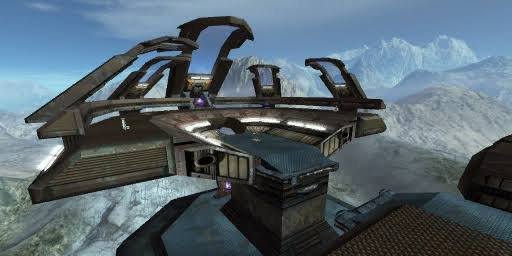
Community Bonus Pack for Unreal Tournament 3
The UT3 series contains several volumes rather than a single small collection. The available documentation lists five major Community Bonus Pack 3 volumes.
Each volume contains additional multiplayer maps, while some volumes also introduce characters or gameplay-related pickups.
For example, Volume 1 contains eight maps covering modes such as Capture the Flag, Deathmatch, Vehicle CTF, and Warfare. Later volumes add more maps and other content. (Unreal Engine Wiki)
What Content Does a Community Bonus Pack Add?
The contents vary by game and release, but the main purpose is to increase the amount of playable content.
| Content | Purpose |
|---|---|
| Maps | Add new multiplayer environments |
| Characters | Introduce additional playable character options |
| Skins | Change the visual appearance of characters |
| Mutators | Modify gameplay rules or mechanics |
| Pickups | Add new gameplay items in selected releases |
| Converted maps | Adapt earlier community content for another game version |
Not every Community Bonus Pack contains every type of content. Checking the specific release is therefore better than assuming that all packs work the same way.
Are Community Bonus Packs Official?
This question can be confusing because the word “community” suggests that everything was unofficial.
The safest answer is that Community Bonus Pack releases are community-created content, but some content received official recognition or approval depending on the release.
That does not mean every similarly named community map pack is official. Players should distinguish the recognized Community Bonus Pack releases from unrelated third-party collections.
How to Install a Community Bonus Pack
Installation depends on the game version and the format of the download.
A typical installation process is:
- Identify your Unreal Tournament version.
Determine whether you are using UT2003, UT2004, or UT3. - Choose the correct Community Bonus Pack.
A pack designed for one game should not automatically be assumed to work with another. - Use a reputable archive or community source.
Avoid unknown executable files and suspicious download sites. - Back up your game files if necessary.
This is especially useful when working with an older installation. - Follow the package’s installation instructions.
Some releases use installers, while others may provide archives that need to be placed in particular game directories. - Launch the game and test the content.
Check whether the new maps, characters, or mutators appear correctly.
Modern community tools can simplify the process. For example, an open-source UT2004 installer supports several Community Bonus Pack releases and provides automated installation options. (GitHub)
Common Installation Problems
Older Unreal Tournament content can sometimes create compatibility issues.
Wrong Game Version
One of the most common mistakes is installing a pack intended for a different game. A UT2003 release and a UT2004 release are not automatically interchangeable.
Missing Dependencies
Some community content may depend on files from another package. If a map or character does not load correctly, check the documentation that came with the release.
Outdated Installers
Very old installers may have been designed for older versions of Windows. In such cases, a maintained community installer or archive can sometimes provide a more convenient solution.
Server Compatibility
If you are joining a multiplayer server, the server may require specific maps or files. Having the same content installed locally can prevent missing-package errors.
Where Can You Find Community Bonus Pack Information?
Because these games are decades old, information is spread across community archives, wikis, repositories, and fan-maintained resources.
Unreal Archive maintains detailed information about older Unreal Tournament content, including map lists and release details. (Unreal Archive)
Community-maintained repositories can also be useful when an old official download page is no longer available. However, users should still verify files and avoid downloading suspicious executables from unknown sources.
Is the Community Bonus Pack Worth Installing?
For players who still enjoy classic Unreal Tournament, community bonus content can significantly expand the available multiplayer experience.
The biggest advantage is variety. Instead of relying only on the original maps, you can explore additional environments and gameplay options created by the game’s long-running community.
The value is especially noticeable for players who enjoy:
- Classic multiplayer FPS games
- Custom maps
- Modding
- Unreal Tournament history
- Community-created content
- LAN or private multiplayer sessions
- Revisiting older PC games
However, you should always choose the pack designed specifically for your game version and check compatibility before installation.
Frequently Asked Questions
What is a Community Bonus Pack
A collection of additional community-created content for games in the Unreal Tournament series. Depending on the release, it can include maps, characters, skins, mutators, and other gameplay content.
How many maps are in the Community Bonus Pack?
The number varies by release. The original UT2003 included 18 maps. UT2004 Community Bonus Pack 2 Volume 1 contains 21 maps, while Volume 2 contains 20 maps. (Liandri)
Is Community Bonus Pack free?
Community-created bonus content has generally been distributed as additional game content rather than as a separate commercial game. However, availability and licensing can vary by specific release, so users should obtain files from legitimate and trustworthy sources.
Does Community Bonus Pack work with every Unreal Tournament game?
No. Different versions were made for different games. UT2003, UT2004, and UT3 have different Community Bonus Pack releases, so you should always verify compatibility before installation.
What is Community Bonus Pack 2?
Community Bonus Pack 2 is a larger UT2004 content collection released in two volumes. Volume 1 includes 21 maps, four characters, and a mutator, while Volume 2 includes 20 maps, four skins, and two mutators. (PCGamingWiki)
Can I use Community Bonus Pack content in multiplayer?
Yes, compatible community maps and other content can be used for multiplayer, but everyone joining a particular server or session may need the required files. Server configuration and game version can also affect compatibility.
Final Thoughts
The Community Bonus Pack series is an important part of Unreal Tournament‘s long history of community-created content. From the 18-map UT2003 release to the larger UT2004 and UT3 collections, these packs gave players new maps and gameplay options long after the original games were released. (Liandri)
If you want to install one today, the most important step is to identify your exact Unreal Tournament version first. From there, choose the matching Community Bonus Pack, verify the source, and follow the installation instructions for that specific release.